UTRN entry on a gas PP smart meter
If your top-up has not reached your meter, don’t worry. You can enter it manually using the steps below. You’ll need your Unique Transaction Number (UTRN) which is found on your receipt, and your meter name.
EDMI GS-60B/68B/60A
Press and hold OK to illuminate the display screen, then press and hold OK to access the main menu.
Continue pressing OK until you reach the PREPAY screen.
Press and hold OK and the TOP UP screen will show.
On the TOP UP option press and hold OK.
You will be requested to enter your UTRN code.
To enter your UTRN use the righthand button to scroll and select your digit.
Press and hold OK to lock in the digit, and then move onto the next digit entry.
If you make an error press and hold the return button.
On your last digit entry press and hold the OK button to submit your UTRN.
Please wait. ‘Applying Top Up’ will be displayed while you wait. Then the message ‘UTRN VALIDATED’ will appear to confirm your entry was a success.
If a ‘UTRN NOT VALIDATED’ message is displayed, please re-enter your 20-digit UTRN, ensuring all digits are accurate.
SECURE EG4V10/V11/V15
Press the blue A button on your gas meter.
The message ’Vend Mode’ should display.
Enter the entire top-up code reference number you get on your paper/email or app receipt.
Then press the red B button on your main gas and/or electricity meter.
Your top-up transaction should now be processed and credited to your meter.
- Once the top-up is processed, one of the following messages will appear on your gas and/or electricity meter:
- Accepted (your top-up has successfully been credited to your meter).
- Rejected, Duplicate (Your top-up has already been credited to your meter).
- Rejected, Incorrect (The top-up code has been entered incorrectly, please try again).
- Rejected, Incomplete (You have not entered the entire top-up code and have missed a few digits).
- Rejected, Invalid (This means you could be at the wrong meter - check what meter the top-up is for - ie. electricity or gas meter, and ensure you are at that meter).
ITRON FGBB03
Press and hold OK to illuminate the display screen, then press and hold OK to access the main menu.
Continue pressing OK until you reach the ‘PREPAY’ screen.
Press and hold OK and the’ TOP UP’ screen will show.
On the ‘TOP U’P option press and hold OK.
You will be requested to enter your UTRN code.
To enter your UTRN use the OK button to scroll and select your digit.
Press and hold OK to lock in the digit and move onto the next digit entry.
If you make an error press and hold the return button.
On your last digit entry press and hold the OK button to submit your UTRN.
Please wait, ‘Applying Top Up’ will be displayed while you wait. Then the message ‘UTRN VALIDATED’ will appear to confirm your entry was a success. .
If a ‘UTRN NOT VALIDATED’ message is displayed, please re-enter your 20-digit UTRN, ensuring all digits are accurate.
HONEYWELL BK-G4E
Wake up the gas meter by pressing the middle button on the meter.
Navigate to the ‘UTRN Entry’ screen by using the right arrow button.
Press the middle button to enter the UTRN entry screen.
Use the arrow buttons to select the first digit of the number and then press the middle button to set the number. Do this for every number.
Once all the 20 digits have been entered, press and hold the middle button to confirm.
A message saying ‘UTRN okay’ will appear.
ACLARA G4SZV/1/2
Press any button to wake up the display, then press button ‘C’ to bring up the menu.
Press button B to scroll down to ‘NEW PAYMENT’.
Press button C to select ‘NEW PAYMENT’. If you need to exit press button A. 4. The words ‘Enter UTRN’ will appear on the screen.
Use the up arrow to move through the digits until you reach the number you want to enter.
Use the right arrow when you’re ready to move to the next number. Continue doing this until you’ve entered all20 digits.
If the top up has not been successful,’ INVALID TOPUP’ will appear, and the meter will return to the ‘ENTER UTRN’ screen.
If the UTRN has been successful, the display will show ‘ACCEPTED’ and return to the menu.
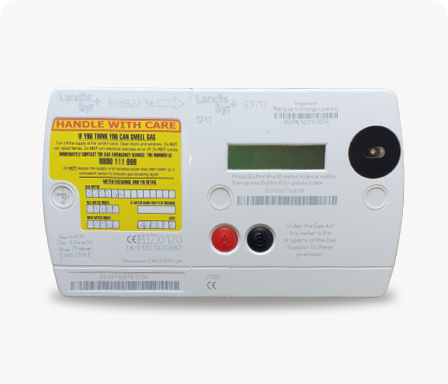
Landis + Gyr G470-672/682
Press A to wake the meter up.
Press A again till you get to the screen that says, ‘Credit Entry,’ then press B for yes.
Enter the first digit of your UTRN – press A to scroll through 0-9 until you get to the right number
Press button B when you’re ready to move onto the next digit.
Once you’ve entered all the numbers, press and hold button B for a few seconds to confirm your UTRN.
The meter will then confirm the payment has been accepted.
Last updated: 8 October 2026